
During this week, we learned about the uniform distribution of shapes. Using for loop, shapes can be neatly distributed on a canvas. This week’s task is also to make an interactive effect of this distribution. When I saw the mission. I find it very difficult to achieve. Because now the process is starting to get complicated. I have to adapt to the pace of learning quickly. So after I got home, I carefully analyzed some cases and procedures taught by the teacher in class. To understand what the corresponding effect of each program is. Change the number of rows and columns or change the direction and density of the graph rotation. This is something to understand. At the end of the class, we also learned an advanced knowledge that the graphics on the canvas will become larger and smaller according to the movement of the mouse. It is very interesting.
In the process of making this work, I thought about how to apply the knowledge I learned in class and how to produce good interactive animation. Then I came across some pictures of love. Love is very dynamic when it is enlarged and shrunk, just like the feeling of our heart beating. Love is very romantic. Pink and red make me feel love and warmth.So I plan to use the distance mapping of the mouse to the proportion of the circle to make an interactive effect about love.
In the process of production, I also applied the knowledge learned in the previous classes. Replace the circle in the picture with a picture of a heart. Import the love picture and then use it.
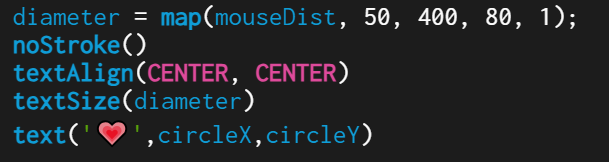
Next, I want to increase the number of hearts and the context. The background becomes black and the number of rows and columns of hearts is increased. When I was doing it, I found a problem that the circle of the template given by the teacher in class was enlarged and shrunk according to the center of the circle. But the love I make is not actually enlarged and reduced by a circular center. So I added a textAlign (CENTER,CENTER) to zoom in and out of the heart to the middle. Otherwise, it will automatically default to zoom in and out with the upper-left corner as the center.
Summerise: In this work, I used what I learned in class to arrange and set dynamic effects for loop. I’m very pleased with the result. It’s an interaction I want. Some of these formulas need to be understood a little bit more. In future works, I hope I can make more use of what I learned in this class, including this dynamic effect and for loop. It seems that for loop is very often used in some works. Because a lot of things have to be arranged neatly so we need to use for loop.